CalmNCalculated
The real app is on this page — scroll down and use it

A wedding planner for brides and couplesPlan the wedding, keep the calm.joy.budget.

The CalmNCalculated Wedding Planner is a browser-based planner for couples planning a wedding, sold as a one-time digital download on Etsy. It is a single HTML file that opens in any modern web browser — no installation, no account, and no internet connection once you have it. It has 12 main sections, from Dashboard to Registry, covering a wedding budget against real spend, a guest list with RSVPs and a seating chart. Everything you type stays in your own browser on your own device.

One-time purchase Stays on your device Works offline
What will the day cost?
Live · drag me
Guests120
Cost per guest$110
120guests
$13,200
for catering and reception, at your numbers
120 guests · $110 each

Your numbers, your arithmetic — nothing here is a claim about anyone else.

No subscription One single file Nothing leaves your device Works offline Opens in any browser Light & dark mode Print-friendly No account, ever

Try the Wedding Planner free, right here

This is the actual product, running on this page with sample data — not a video, not screenshots. If you like it, the file you buy is this, minus the sample numbers.

Wedding Planner — one file, running in your browser

The whole app, right here.

Loads in a second. Click around, change things — it's yours to break.

Prefer a full window? Open the demo full-screen — same thing, more room.

How the Wedding Planner works, step by step

Four moments from real use — the screen changes as you read.

Any evening

Open it. See where the wedding stands.

Days to go, how much of the budget is committed, how many have replied — the overview answers the three questions you actually ask.

After every quote

The budget stops being a guess.

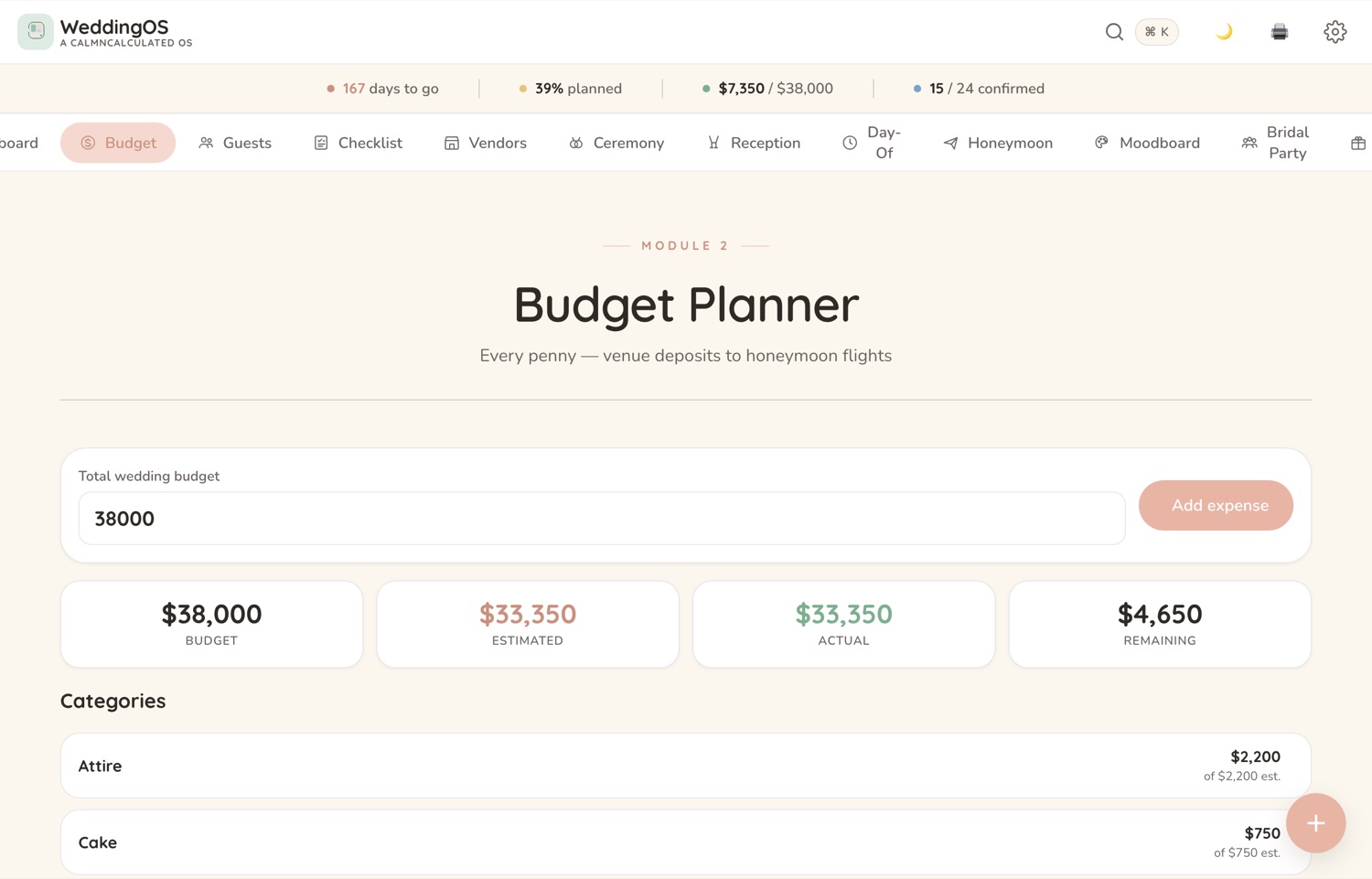
Every cost sits against what you set aside, so 'are we over?' has an answer instead of a feeling.

As the replies come in

Guests, and who's actually coming.

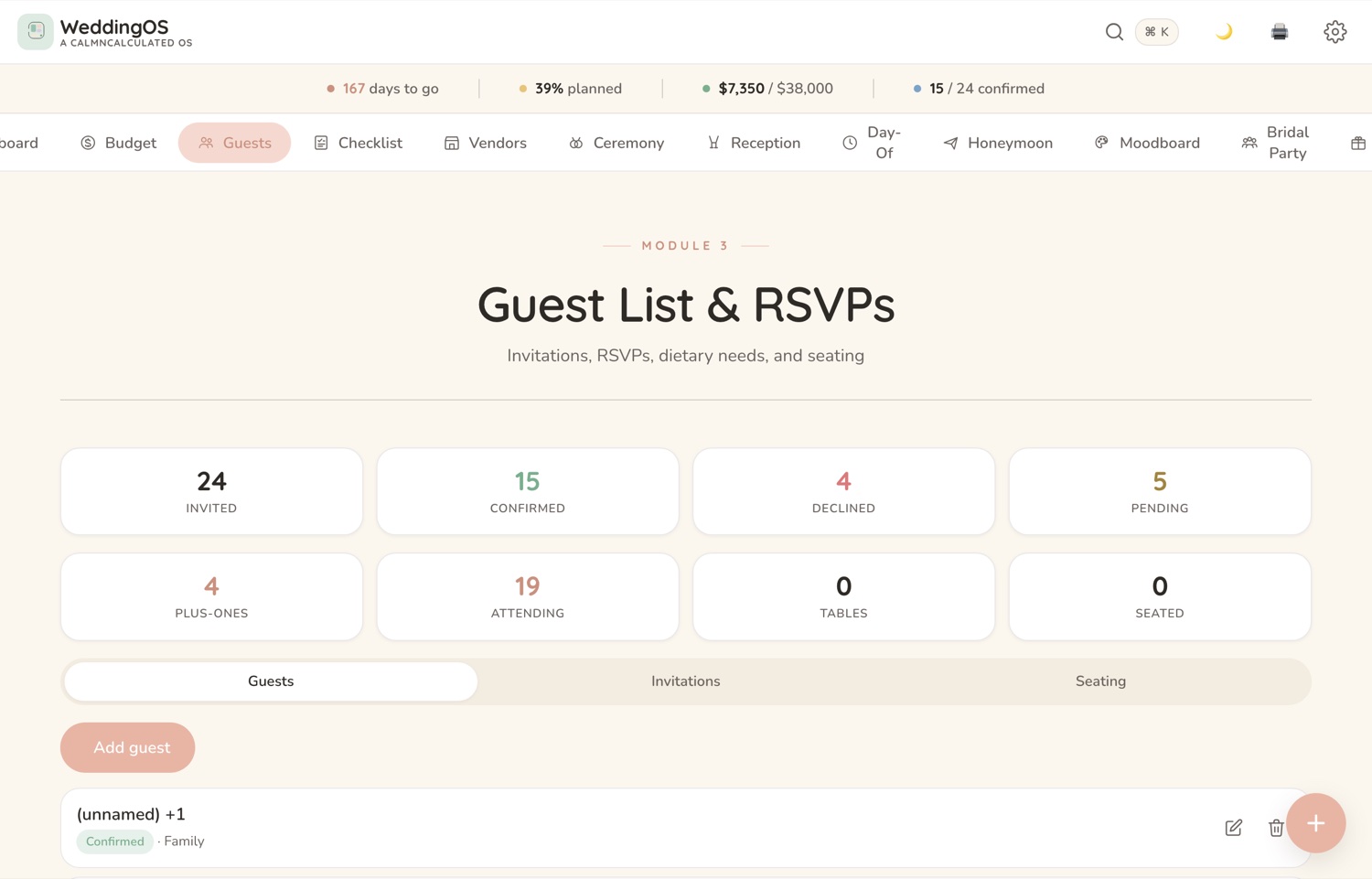
The list tracks invitations, RSVPs and numbers, so catering and seating come off real figures.

Week by week

A checklist that runs to the day.

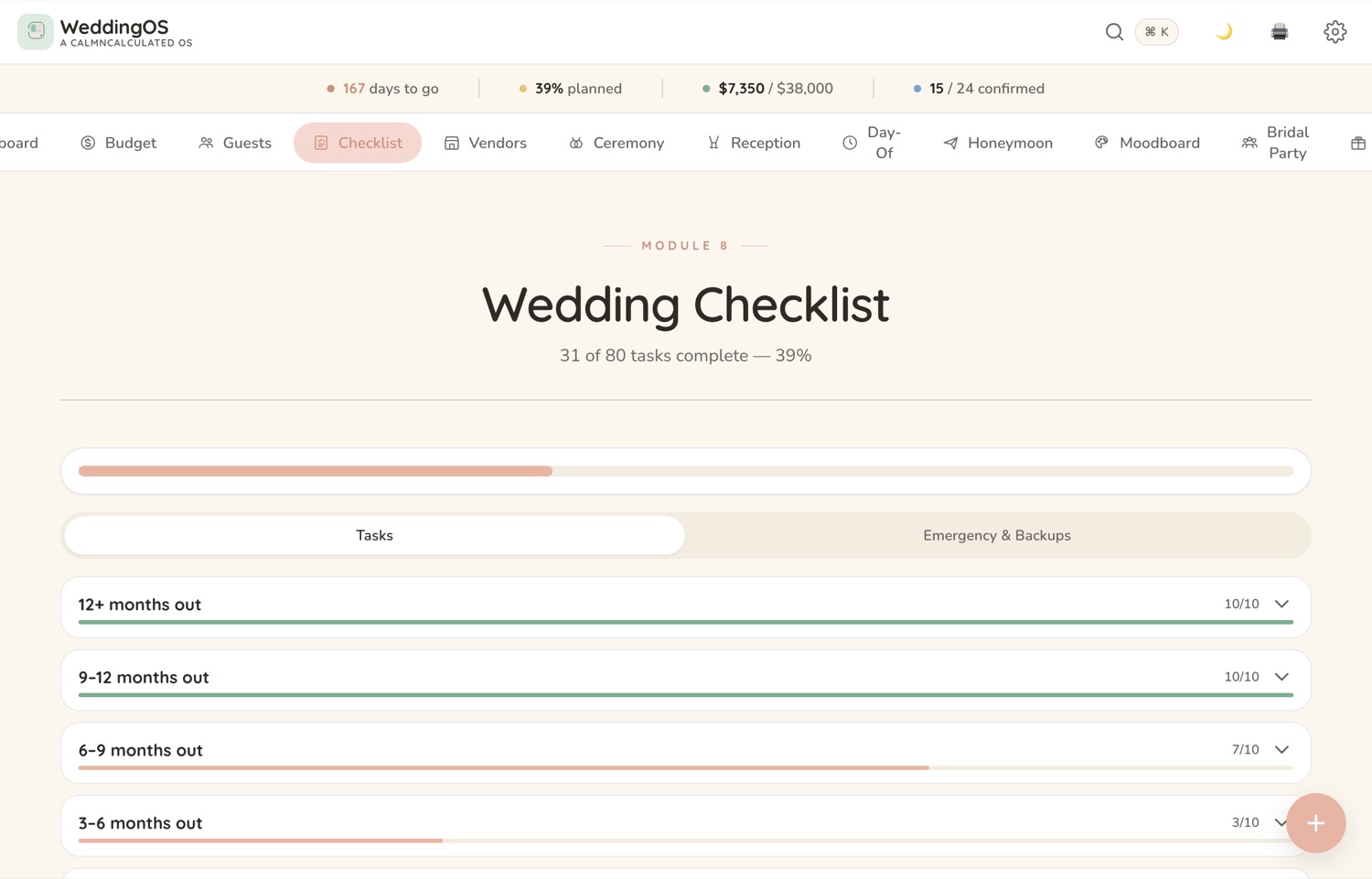
What's done, what's next, what can't slip — in the order a wedding actually happens.
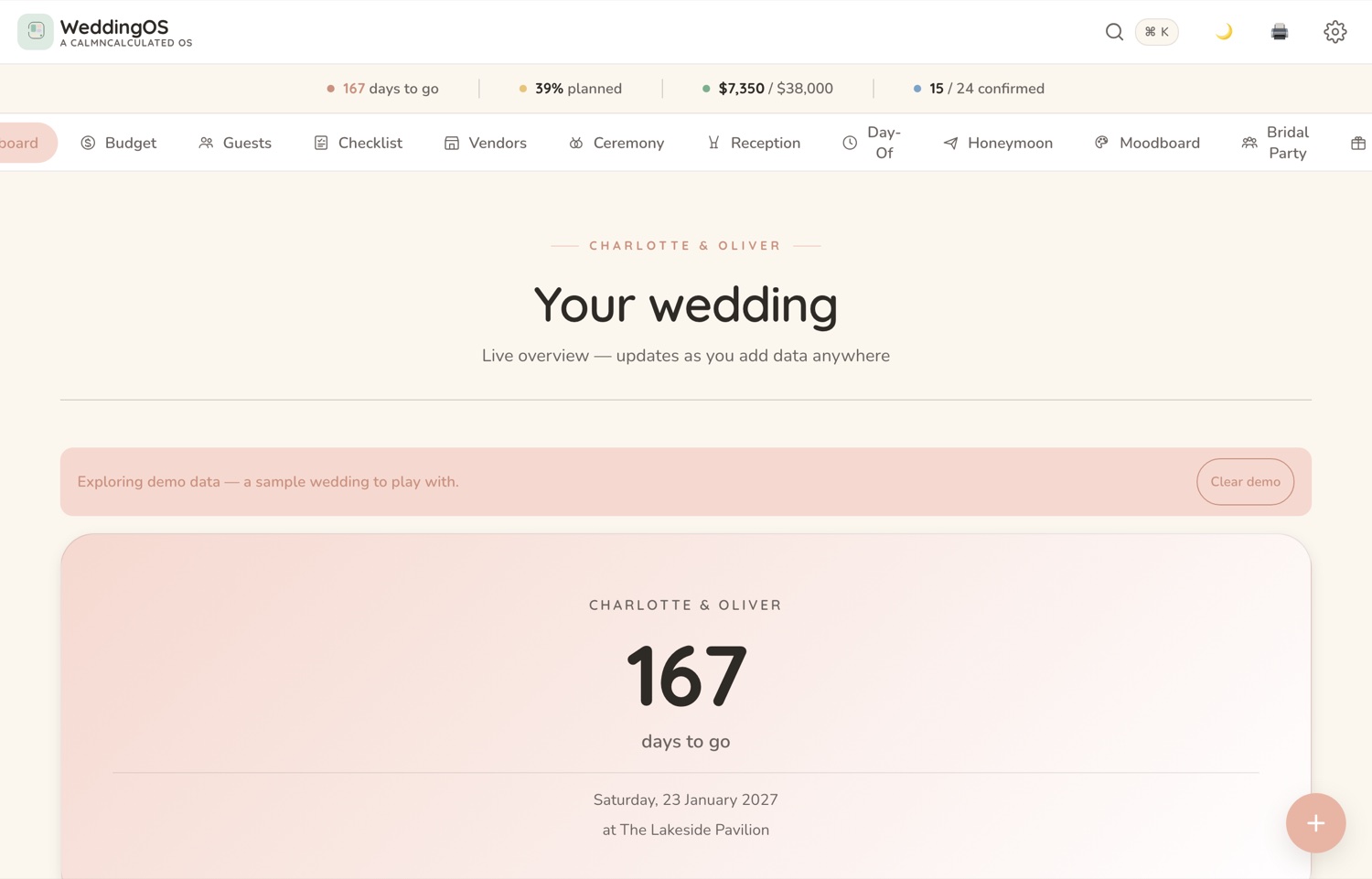
The Dashboard screen in the CalmNCalculated Wedding Planner, showing days to go, budget committed and replies received The Budget screen in the CalmNCalculated Wedding Planner, showing every cost held against what was set aside The Guests screen in the CalmNCalculated Wedding Planner, showing the guest list with invitations, RSVPs and numbers The Checklist screen in the CalmNCalculated Wedding Planner, showing a checklist ordered by when things have to happen
DashboardBudgetGuestsChecklist

What's inside: 12 sections, one file, no subscription

Everything below is in the app you just tried.

The Budget screen in the CalmNCalculated Wedding Planner, showing every cost held against what was set asideBudget
12
main sections
6
things it covers
1
file — nothing to install
$0
per month, forever — you buy it once
The Guests screen in the CalmNCalculated Wedding Planner, showing the guest list with invitations, RSVPs and numbersGuests
no account, no cloud, no server
works fully offline, once it's on your device
light & dark mode · print-friendly
a Help tab inside, so the manual travels with the file

What the guest list actually drives

The wedding planner holds every cost against what you set aside, on its own Budget screen. Here is the shape of it, with your number.

Cost per guest$110

At $110 a head, 150 guests is 16,500 dollars.

The wedding planner holds every cost against what you set aside, so this stops being a guess.

The Budget screen in the CalmNCalculated Wedding Planner, showing every cost held against what was set aside
Budget — running on the sample data.

No account. No cloud. No catch.

It's one HTML file that runs in your browser. That single fact is what makes all four of these true.

0
accounts
Nothing to sign up for. No email, no password.
0
servers
There is nowhere for your information to be sent.
0
renewals
Bought once on Etsy. Nothing recurring, ever.
0
connection needed
Works fully offline once the file is on your device.

That last one is the proof of the others. An app that keeps working with the internet switched off is an app that isn't sending anything anywhere.

Wedding Planner specifications

What it is
A wedding planner that runs as one HTML file in your web browser
Who it's for
Couples planning a wedding
Main sections
12 — Dashboard, Budget, Guests, Checklist, Vendors, Ceremony, Reception, Day-Of, Honeymoon, Moodboard, Bridal Party, Registry
What it covers
A wedding budget against real spend; A guest list with RSVPs; A seating chart; Vendors and their details; A day-of timeline; A checklist that runs to the day
Where data is stored
In your own browser, on your own device. No server, no account, no sync.
Internet required
No — works fully offline once downloaded
Works on
Windows, macOS, iPad, Android, Linux — anything with a modern browser
Also included
A Help tab built into the app, light and dark mode, print-friendly views, and sample data you can load and clear in one click
Delivery
Instant digital download from Etsy
Pricing model
One-time purchase. No subscription, no recurring fee.

Wedding Planner FAQ

Does the Wedding Planner need a subscription?
No. You buy the file once on Etsy and it's yours. Nothing renews and there's no account to keep.
What sections does the Wedding Planner have?
12 main sections: Dashboard, Budget, Guests, Checklist, Vendors, Ceremony, Reception, Day-Of, Honeymoon, Moodboard, Bridal Party, Registry. Sample data is already in all of them when you open it, so you can see how each one works before you put your own information in.
Where is my data stored?
In your own browser, on your own device. Nothing you type is sent to us — we have no server that could receive it. That also means clearing your browser data clears the app, so keep a copy of anything you'd hate to lose.
Does it work offline?
Yes. It's a single file that opens in your browser, so once you have it you don't need to be online.
What devices does it work on?
Any device with a modern web browser — Windows, Mac, iPad, Android tablet, phone or Linux. There is nothing to install and no account to create.
Can I use it on more than one device?
Yes — the same file opens anywhere. But because nothing is stored on a server, what you type on one device stays on that device; the two copies won't sync. Most people keep it on the one they actually plan on.
How do I get the file after I buy it?
It's an instant digital download from Etsy. As soon as Etsy confirms your payment the file is in your Etsy Purchases, and you can download it again from there any time you're signed in.
What exactly do I get?
The planner file itself, a Help tab built into the app so the manual travels with it, and sample data you can load and clear in one click. Light and dark mode, and print-friendly views.

You've already used it. That was the demo.

If the app above felt right, the file you buy is exactly that — minus the sample data, plus your own real life getting calmer.

Pairs well with

Budget Planner

The wedding ends. The joint finances don't. Twelve months, three budgeting methods, and the subscription audit that finds what you forgot you were paying for.

Try the Budget Planner

Fourteen planners for life's big moments

Every one is a single file you buy once, opens in your browser, and keeps your data on your own device. All of them are free to try — no sign-up.

See them all with screenshots & prices

Wedding Planner
One-time purchase · try it free above