CalmNCalculated
The real app is on this page — scroll down and use it

A pregnancy planner and tracker for first-time mumsGet ready without the overwhelm.panic.spreadsheets.

The CalmNCalculated Pregnancy Planner is a browser-based planner for first-time parents preparing for a baby, sold as a one-time digital download on Etsy. It is a single HTML file that opens in any modern web browser — no installation, no account, and no internet connection once you have it. It has 7 main sections, from Dashboard to Milestones, covering a trimester-by-trimester checklist, a hospital bag list and a baby registry. Everything you type stays in your own browser on your own device.

One-time purchase Stays on your device Works offline
How long have you got?
Live · drag me
Weeks pregnant20
50%along
20 weeks
to go, on a 40-week count
Second trimester · week 20

Your numbers, your arithmetic — nothing here is a claim about anyone else.

No subscription One single file Nothing leaves your device Works offline Opens in any browser Light & dark mode Print-friendly No account, ever

Try the Pregnancy Planner free, right here

This is the actual product, running on this page with sample data — not a video, not screenshots. If you like it, the file you buy is this, minus the sample numbers.

Pregnancy Planner — one file, running in your browser

The whole app, right here.

Loads in a second. Click around, change things — it's yours to break.

Prefer a full window? Open the demo full-screen — same thing, more room.

How the Pregnancy Planner works, step by step

Four moments from real use — the screen changes as you read.

Any week

Where you are, without the maths.

How far along, what's coming, what still needs doing — the overview does the counting so you don't.

Trimester by trimester

A timeline that paces itself.

Appointments, decisions and preparation land when they're actually due, not all at once in a panic.

Before the pram shopping

A budget for the whole arrival.

What you've bought, what's left, what people are gifting — before it turns into an expensive fog.

The last few weeks

Hospital bag and the rest.

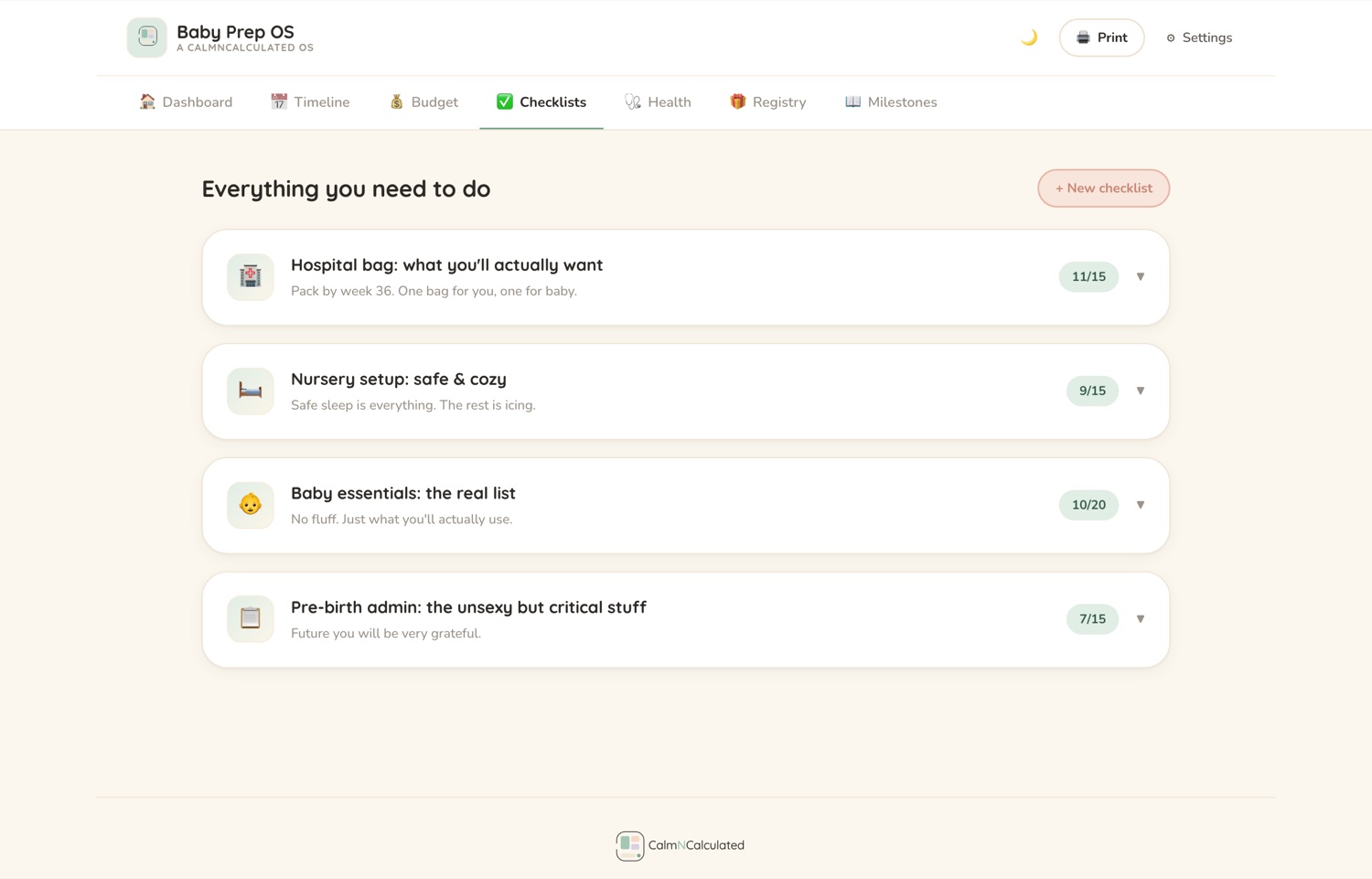
Checklists you tick rather than re-derive at 3am, including the one you'll actually pack.
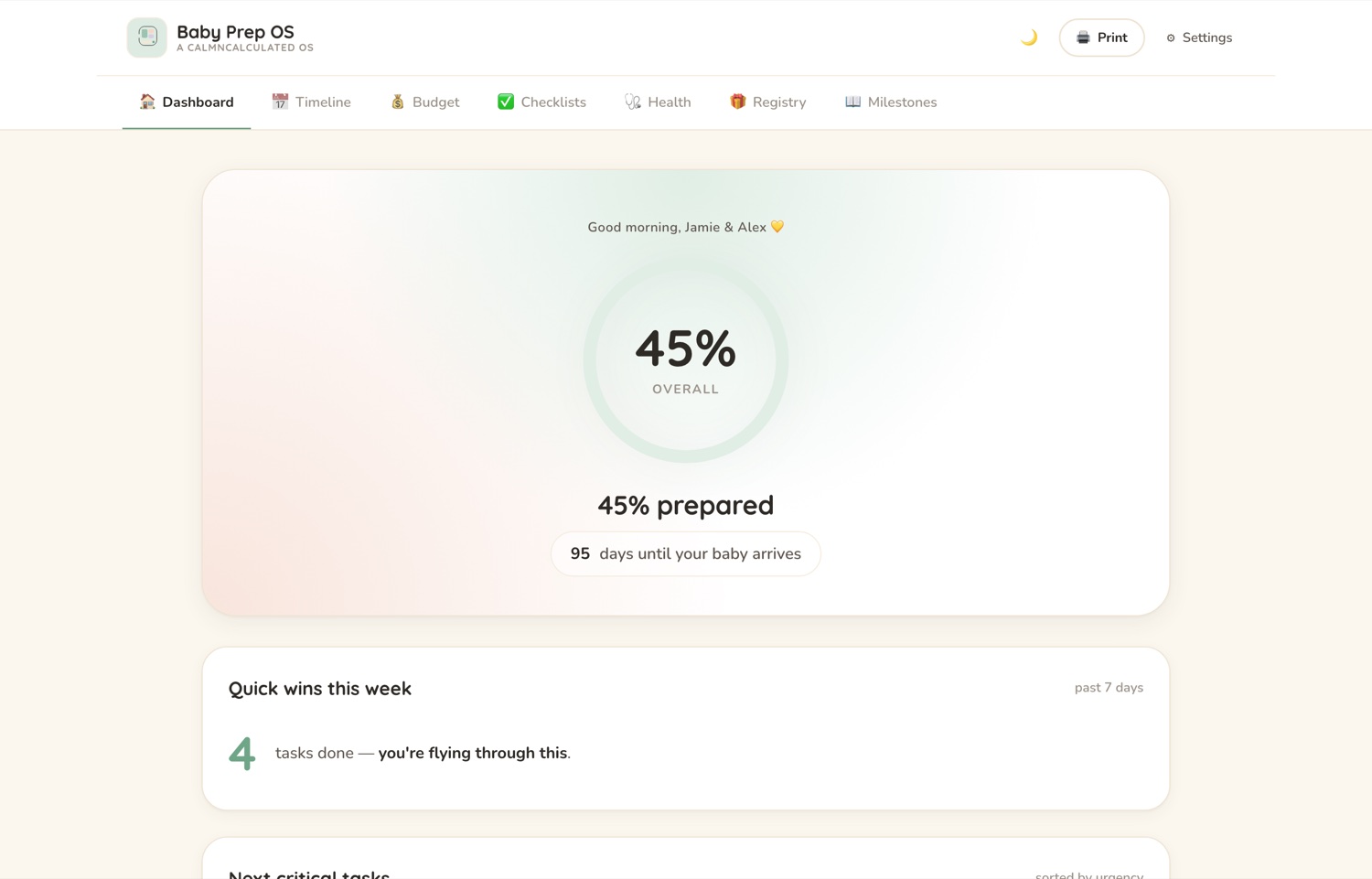
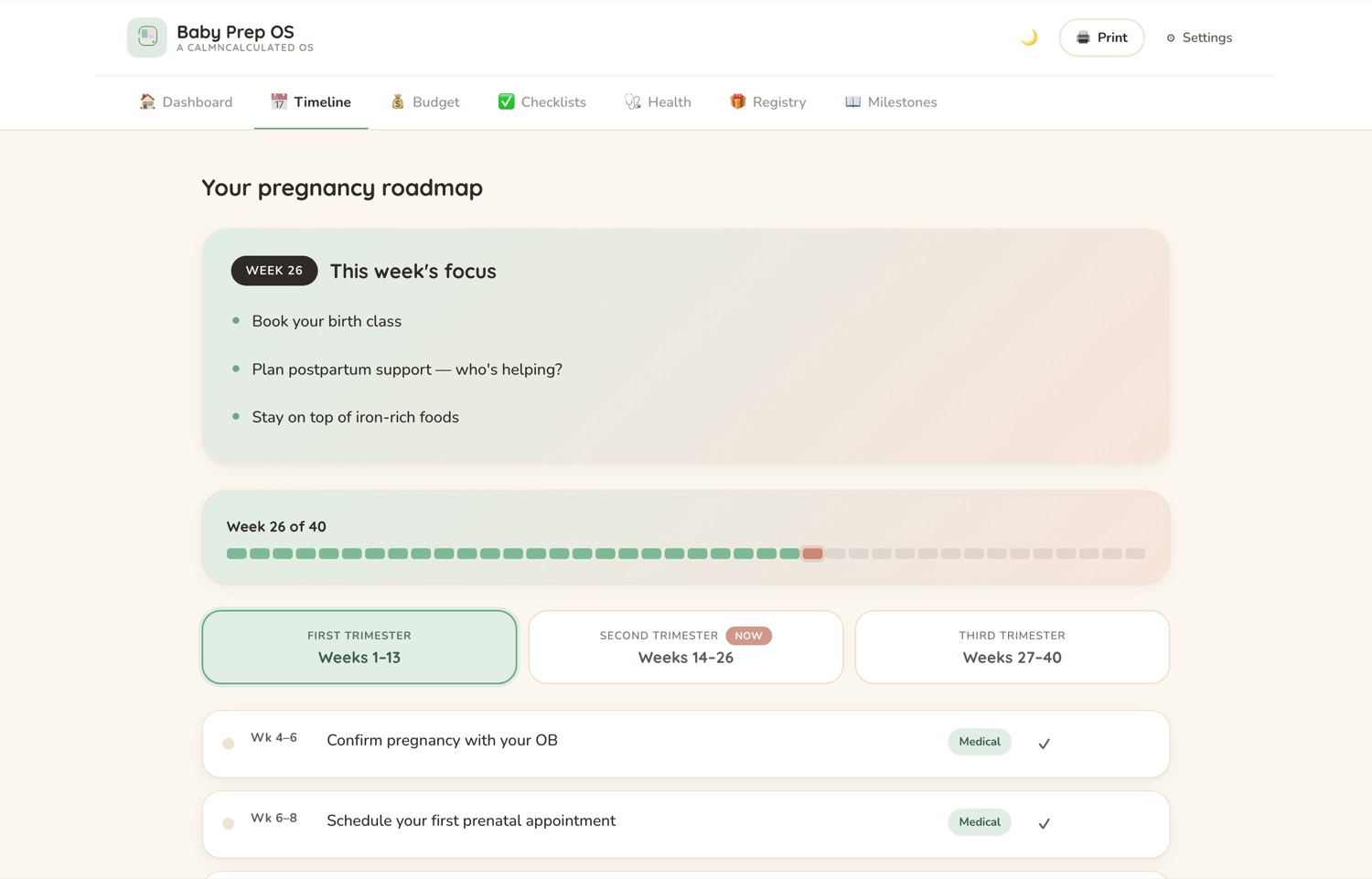
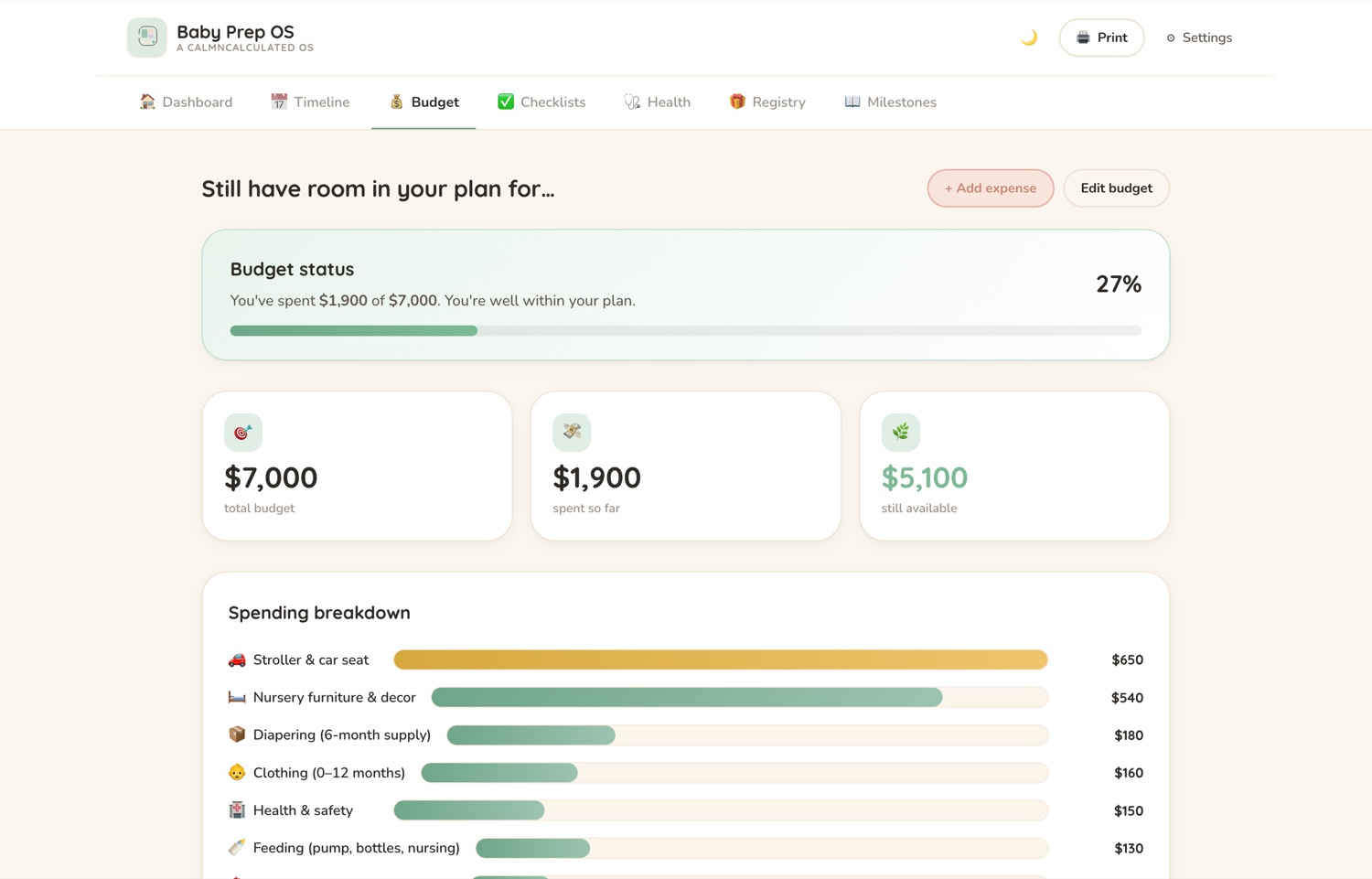
The Dashboard screen in the CalmNCalculated Pregnancy Planner, showing how far along, what's coming and what still needs doing The Timeline screen in the CalmNCalculated Pregnancy Planner, showing appointments and preparation paced across the weeks The Budget screen in the CalmNCalculated Pregnancy Planner, showing a budget for the arrival, bought against still to buy The Checklists screen in the CalmNCalculated Pregnancy Planner, showing the hospital bag and the other checklists
DashboardTimelineBudgetChecklists

What's inside: 7 sections, one file, no subscription

Everything below is in the app you just tried.

The Timeline screen in the CalmNCalculated Pregnancy Planner, showing appointments and preparation paced across the weeksTimeline
7
main sections
5
things it covers
1
file — nothing to install
$0
per month, forever — you buy it once
The Budget screen in the CalmNCalculated Pregnancy Planner, showing a budget for the arrival, bought against still to buyBudget
no account, no cloud, no server
works fully offline, once it's on your device
light & dark mode · print-friendly
a Quick Start guide, so setup takes minutes

What's left, by trimester

The pregnancy planner paces its checklists and appointments by week, so move the weeks and see the runway.

Weeks pregnant20

At week 20, there are 20 weeks to go on a 40-week count.

The planner paces appointments and checklists against exactly this, so nothing lands all at once.

The Timeline screen in the CalmNCalculated Pregnancy Planner, showing appointments and preparation paced across the weeks
Timeline — running on the sample data.

No account. No cloud. No catch.

It's one HTML file that runs in your browser. That single fact is what makes all four of these true.

0
accounts
Nothing to sign up for. No email, no password.
0
servers
There is nowhere for your information to be sent.
0
renewals
Bought once on Etsy. Nothing recurring, ever.
0
connection needed
Works fully offline once the file is on your device.

That last one is the proof of the others. An app that keeps working with the internet switched off is an app that isn't sending anything anywhere.

Pregnancy Planner specifications

What it is
A pregnancy planner that runs as one HTML file in your web browser
Who it's for
First-time parents preparing for a baby
Main sections
7 — Dashboard, Timeline, Budget, Checklists, Health, Registry, Milestones
What it covers
A trimester-by-trimester checklist; A hospital bag list; A baby registry; Nursery planning; Appointments and notes
Where data is stored
In your own browser, on your own device. No server, no account, no sync.
Internet required
No — works fully offline once downloaded
Works on
Windows, macOS, iPad, Android, Linux — anything with a modern browser
Also included
A 3-page Quick Start guide, light and dark mode, print-friendly views, and sample data you can load and clear in one click
Delivery
Instant digital download from Etsy
Pricing model
One-time purchase. No subscription, no recurring fee.

Pregnancy Planner FAQ

Does the Pregnancy Planner need a subscription?
No. You buy the file once on Etsy and it's yours. Nothing renews and there's no account to keep.
What sections does the Pregnancy Planner have?
7 main sections: Dashboard, Timeline, Budget, Checklists, Health, Registry, Milestones. Sample data is already in all of them when you open it, so you can see how each one works before you put your own information in.
Where is my data stored?
In your own browser, on your own device. Nothing you type is sent to us — we have no server that could receive it. That also means clearing your browser data clears the app, so keep a copy of anything you'd hate to lose.
Does it work offline?
Yes. It's a single file that opens in your browser, so once you have it you don't need to be online.
What devices does it work on?
Any device with a modern web browser — Windows, Mac, iPad, Android tablet, phone or Linux. There is nothing to install and no account to create.
Can I use it on more than one device?
Yes — the same file opens anywhere. But because nothing is stored on a server, what you type on one device stays on that device; the two copies won't sync. Most people keep it on the one they actually plan on.
How do I get the file after I buy it?
It's an instant digital download from Etsy. As soon as Etsy confirms your payment the file is in your Etsy Purchases, and you can download it again from there any time you're signed in.
What exactly do I get?
The planner file itself, a 3-page Quick Start guide, so setup takes minutes, and sample data you can load and clear in one click. Light and dark mode, and print-friendly views.

You've already used it. That was the demo.

If the app above felt right, the file you buy is exactly that — minus the sample data, plus your own real life getting calmer.

Pairs well with

Newborn Baby Tracker

What happens after the due date. Feeds, sleep and nappies in a tap, growth and milestones, and the vaccine record — the first year, tracked.

Try the Newborn Baby Tracker

Fourteen planners for life's big moments

Every one is a single file you buy once, opens in your browser, and keeps your data on your own device. All of them are free to try — no sign-up.

See them all with screenshots & prices

Pregnancy Planner
One-time purchase · try it free above