CalmNCalculated
The real app is on this page — scroll down and use it

An end of life planner and estate organizerLeave them answers, not a search.a guessing game.a mess.

The CalmNCalculated End of Life Planner is a browser-based planner for anyone organising their affairs for the people they'll leave behind, sold as a one-time digital download on Etsy. It is a single HTML file that opens in any modern web browser — no installation, no account, and no internet connection once you have it. It has 10 main sections, from Dashboard to Messages, covering will and estate details, accounts, documents and where to find them and medical wishes. Everything you type stays in your own browser on your own device.

One-time purchase Stays on your device Works offline
How long would they be searching?
Live · drag me
Accounts and documents24
Hours to track each down2
24to record
48 hours
your family could spend looking, at your estimate
24 things · 2 hours each

Your numbers, your arithmetic — nothing here is a claim about anyone else.

No subscription One single file Nothing leaves your device Works offline Opens in any browser Light & dark mode Print-friendly No account, ever

Try the End of Life Planner free, right here

This is the actual product, running on this page with sample data — not a video, not screenshots. If you like it, the file you buy is this, minus the sample numbers.

End of Life Planner — one file, running in your browser

The whole app, right here.

Loads in a second. Click around, change things — it's yours to break.

Prefer a full window? Open the demo full-screen — same thing, more room.

How the End of Life Planner works, step by step

Four moments from real use — the screen changes as you read.

Whenever you add a piece

How complete the picture is.

What's recorded, what's still missing — so this becomes a thing you finish rather than a thing you avoid.

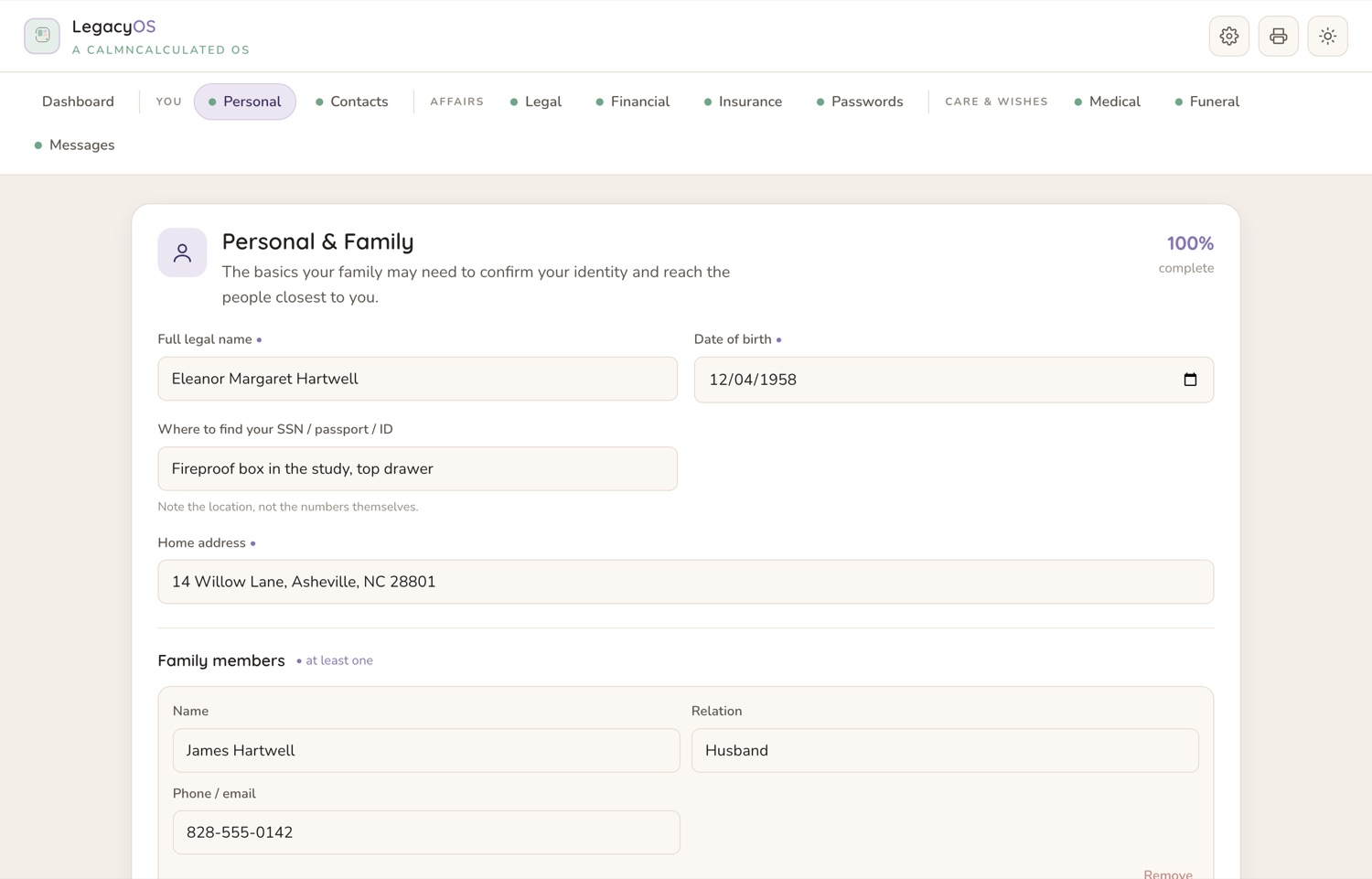
The basics first

You, on paper.

The details someone will need immediately and would otherwise have to hunt for or guess at.

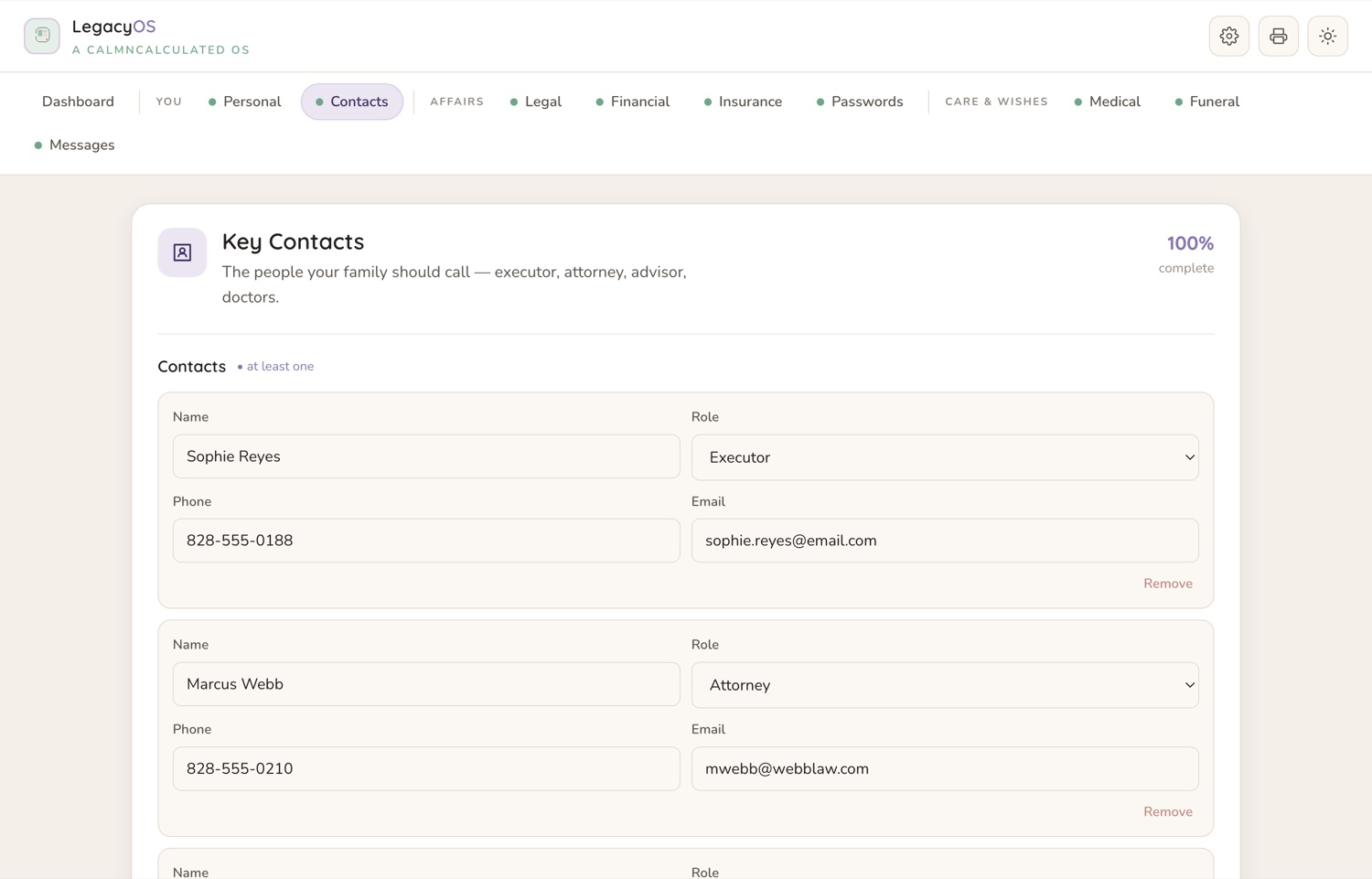
The people

Who to call, in what order.

Solicitor, accountant, executor, the friend who knows about the boiler. Names and numbers in one place.

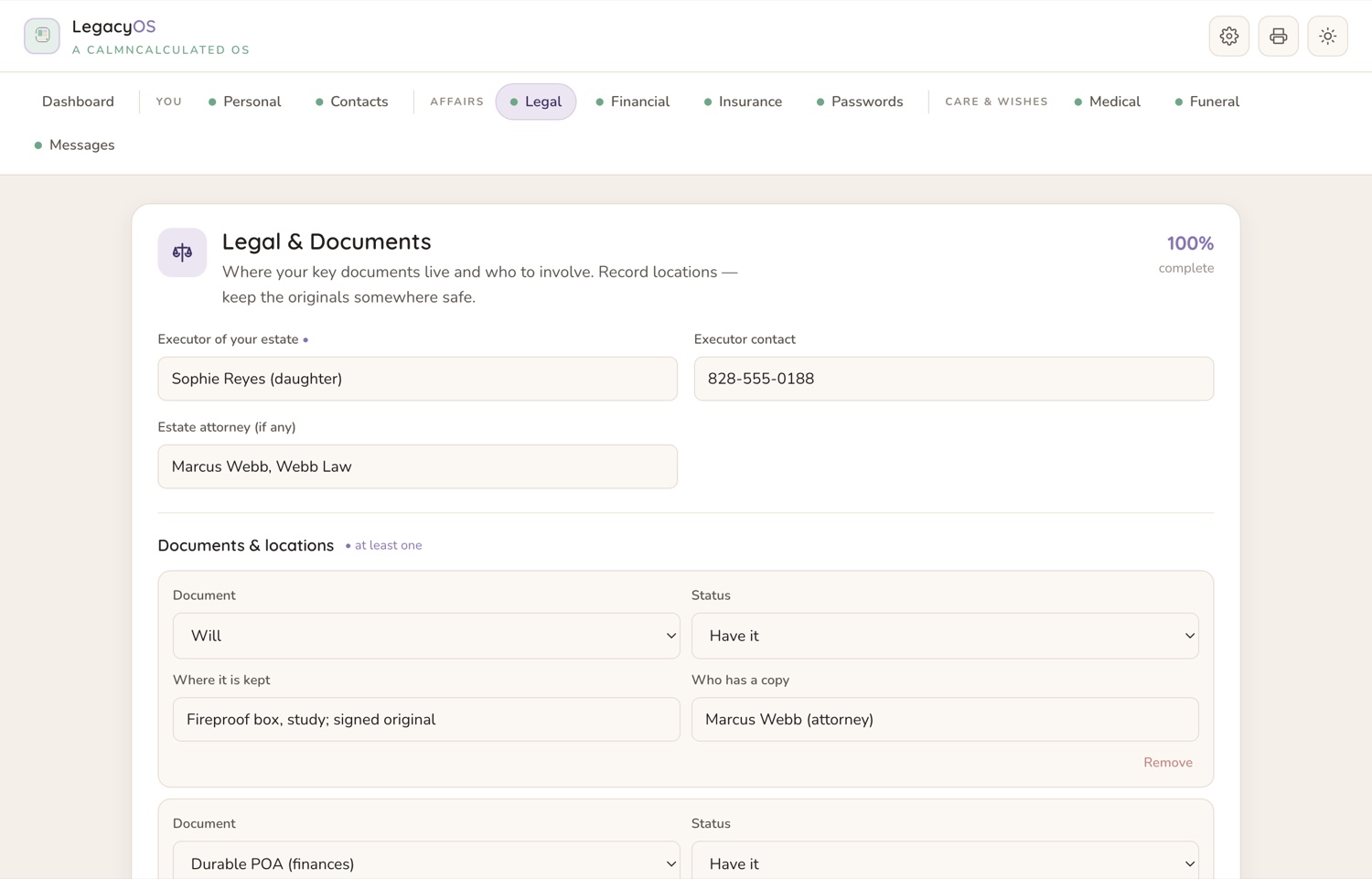
The hard part

Legal, and where it all lives.

Will, deeds, policies — not the documents themselves, but exactly where to find each one.
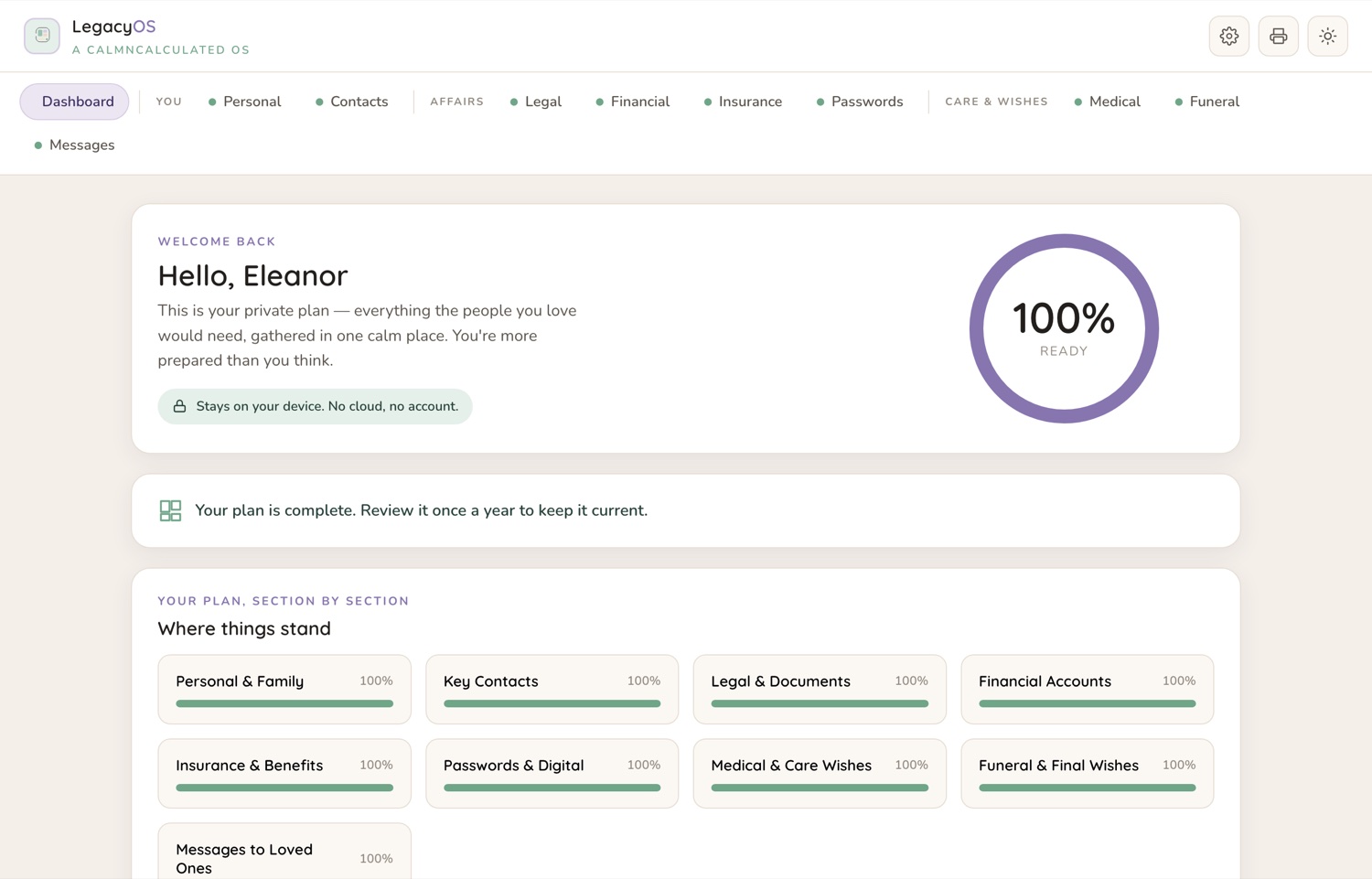
The Dashboard screen in the CalmNCalculated End of Life Planner, showing how complete the record is, and what's still missing The Personal screen in the CalmNCalculated End of Life Planner, showing the personal details someone would otherwise hunt for The Contacts screen in the CalmNCalculated End of Life Planner, showing who to call, in what order The Legal screen in the CalmNCalculated End of Life Planner, showing will, deeds and policies, and where each one lives
DashboardPersonalContactsLegal

Inside the app: 10 sections, one file, no subscription

Everything below is in the app you just tried.

The Personal screen in the CalmNCalculated End of Life Planner, showing the personal details someone would otherwise hunt forPersonal
10
main sections
5
things it covers
1
file — nothing to install
$0
per month, forever — you buy it once
The Contacts screen in the CalmNCalculated End of Life Planner, showing who to call, in what orderContacts
no account, no cloud, no server
works fully offline, once it's on your device
light & dark mode · print-friendly
a free companion book and a Quick Start guide, in the same download

Three editions. The same plan.

One download holds all three. Most people pick one and keep the others for what they're good at — nothing is locked, nothing expires, and you can move between them whenever you like.

The app

One private HTML file that opens in any browser. A dashboard shows how ready your plan is and names the next three things to do, across nine guided sections in three groups. One click prints the "For My Family" sheet, built from what you have already entered. Nothing you type into it leaves your device.

  • Nine sections in three groups, plus the Dashboard
  • One-click "For My Family" printed sheet, built from what's entered
  • Optional privacy PIN, light and dark mode, whole-plan backup and restore
Play with it on this page
Pick this if you want the running record.

The workbook

A real .xlsx — not an export. The Dashboard works out the same readiness figure the app does, from the same answers, and names the same next three things. The "For My Family" tab assembles itself from the tabs in front of it, so it cannot go stale while they are current. Opens in Excel, Google Sheets or LibreOffice.

  • Thirteen tabs, live formulas already written
  • A "For My Family" tab that builds itself from the tabs behind it
  • A hosted Google Sheets template — File → Make a copy and you're in
Pick this if you'd rather work in a spreadsheet.

The printable pack

37 page designs for the folder in the desk drawer or the fireproof box — the page to read first and the people to call, documents and where each is kept, accounts and beneficiaries with an audit page that catches what's gone out of date, insurance, passwords and platform settings, care preferences, funeral and final wishes and what to spend, three pages of letters, the first two weeks, and the yearly review.

  • Every design set for both A4 and US Letter — 74 pages in all
  • Print one half of the file — the cover says which
  • Undated, so print any page any month of any year
Pick this if paper is what actually gets read.

Two more files come with them. The Kindest Paperwork is a free 52-page book on the practical side of getting your affairs in order — twelve chapters across four parts, every figure traced to the organisation that publishes it, and a page near the end naming the widely repeated claims that did not survive checking. A Quick Start guide gets all three editions moving in minutes. Five files in total, one download, one payment.

How long the search would take

The end of life planner records where each account and document actually lives. Set how long each one would take to find.

Hours to find each2

At 2 hours each, 40 things is 80 hours of searching.

Every item you record here is one your family never has to hunt for.

The Personal screen in the CalmNCalculated End of Life Planner, showing the personal details someone would otherwise hunt for
Personal — running on the sample data.

No account. No cloud. No catch.

It's one HTML file that runs in your browser. That single fact is what makes all four of these true.

0
accounts
Nothing to sign up for. No email, no password.
0
servers
There is nowhere for your information to be sent.
0
renewals
Bought once on Etsy. Nothing recurring, ever.
0
connection needed
Works fully offline once the file is on your device.

That last one is the proof of the others. An app that keeps working with the internet switched off is an app that isn't sending anything anywhere.

End of Life Planner specifications

What it is
An end of life planner and estate organizer in three editions — a browser app, an Excel & Google Sheets workbook, and a printable pack
Formats
HTML app (any browser) · .xlsx workbook, 13 tabs (Excel, Google Sheets, LibreOffice) · 74-page printable pack (A4 + US Letter)
Who it's for
Anyone organising their affairs for the people they'll leave behind
Main sections
10 — Dashboard, Personal, Contacts, Legal, Financial, Insurance, Passwords, Medical, Funeral, Messages
What it covers
Will and estate details; Accounts, documents and where to find them; Medical wishes; Final wishes and funeral preferences; An executor checklist
Where data is stored
In your own browser, on your own device. No server, no account, no sync.
Internet required
No — works fully offline once downloaded
Works on
Windows, macOS, iPad, Android, Linux — anything with a modern browser
Also included
The free 52-page book The Kindest Paperwork, a Quick Start guide for all three editions, light and dark mode, print-friendly views, and sample data you can load and clear in one click
Delivery
Instant digital download from Etsy
Pricing model
One-time purchase. No subscription, no recurring fee.

End of Life Planner FAQ

Does the End of Life Planner need a subscription?
No. You buy the file once on Etsy and it's yours. Nothing renews and there's no account to keep.
What sections does the End of Life Planner have?
10 main sections: Dashboard, Personal, Contacts, Legal, Financial, Insurance, Passwords, Medical, Funeral, Messages. Sample data is already in all of them when you open it, so you can see how each one works before you put your own information in.
Where is my data stored?
In your own browser, on your own device. Nothing you type is sent to us — we have no server that could receive it. That also means clearing your browser data clears the app, so keep a copy of anything you'd hate to lose.
Does it work offline?
Yes. It's a single file that opens in your browser, so once you have it you don't need to be online.
What devices does it work on?
Any device with a modern web browser — Windows, Mac, iPad, Android tablet, phone or Linux. There is nothing to install and no account to create.
Can I use it on more than one device?
Yes — the same file opens anywhere. But because nothing is stored on a server, what you type on one device stays on that device; the two copies won't sync. Most people keep it on the one they actually plan on.
How do I get the file after I buy it?
It's an instant digital download from Etsy. As soon as Etsy confirms your payment the file is in your Etsy Purchases, and you can download it again from there any time you're signed in.
What exactly do I get?
Five files: the app, the workbook (.xlsx for Excel, Google Sheets and LibreOffice), the printable pack (A4 and US Letter), the free 52-page book The Kindest Paperwork, and a Quick Start guide that covers all of them.
Do I need Excel for the workbook?
No. The workbook is a real .xlsx that also opens in Google Sheets and LibreOffice, and the download includes a hosted Google Sheets template — File → Make a copy and you're in.
Is any of it encrypted?
No, and we won't pretend otherwise. The optional PIN in the app is a privacy screen, not encryption. Keep the file and your backup somewhere safe, the way you'd keep paper documents.
Which edition should I use?
The app for the day-to-day record and the printed "For My Family" sheet, the workbook if you live in spreadsheets, the printable pack for the folder and the fireproof box. All three follow the same method in the same words, so mixing them is normal — and all three are in the one download.

You've already used it. That was the demo.

If the app above felt right, the file you buy is exactly that — minus the sample data, plus your own real life getting calmer.

Pairs well with

Caregiver Planner

For the day-to-day of looking after someone. Medications and doses, appointments and who's taking them, a daily care log, and notes shared between family carers.

Try the Caregiver Planner

Sixteen planners for life's big moments

Every one is a single file you buy once, opens in your browser, and keeps your data on your own device. All of them are free to try — no sign-up.

See them all with screenshots & prices

End of Life Planner
One-time purchase · try it free above